moodle-tiny_eduplay
One button in the editor to put an EduPlay video in any course text.
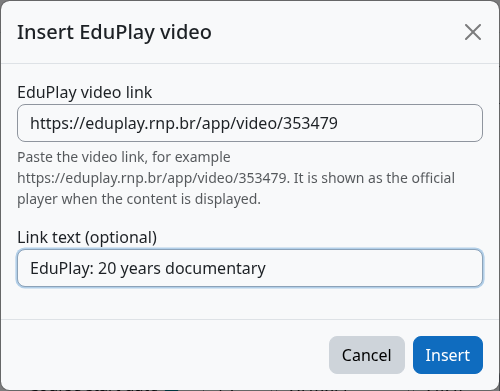
The EduPlay dialog of the Moodle editor.
Insert in seconds. Click the EduPlay button, paste the link, choose the text, done.
Mistakes are caught early. A wrong or unsupported link keeps the dialog open and explains the problem, instead of leaving a broken link in the course.
Friendly to everyone. Labelled fields, an error announced to screen readers and full keyboard use.
Clean content. Only the normal EduPlay link is stored; the player appears when the page is displayed.
See it in 30 seconds
Click the button, paste the link, insert, save (Moodle interface in English).
Start in three steps
Install
local_eduplayandtiny_eduplay(Installation).In the Moodle editor, click the EduPlay button (or Insert > Insert EduPlay video).
Paste the link and click Insert.
Pair it with media_eduplay to display the link as the official player.
What it is
moodle-tiny_eduplay adds a button and an Insert menu item to the Moodle TinyMCE editor to insert EduPlay videos. The author pastes the video link, the plugin validates it, and the canonical link is inserted into the content; moodle-media_eduplay shows it as the official player when the content is displayed. It is part of the unofficial EduPlay Moodle Suite.
Versão em português: Português (Brasil).
Warning
This project is unofficial. It has no affiliation with, or endorsement by, RNP, EduPlay or Moodle HQ.
Main features
Validated insertion: only
https://eduplay.rnp.br/app/video/{id}links (or the embed form, which is normalized) are accepted.Canonical reference: only the canonical link is stored in the content, never a temporary media URL.
Accessible dialog: labelled fields, an error message announced to assistive technologies and keyboard operation.
Moodle 4.5 LTS and 5.3 LTS.